Zoho CRM: Consultant vs. Building It Yourself with AI — What Each One Actually Costs
For most of the last decade, “should I hire a Zoho consultant or do it myself?” had a boring answer. Doing it yourself meant reading documentation, watching community videos, and guessing at Deluge syntax until something worked. Most business owners tried for a few weekends, got a half-configured Leads module, and called someone.
That’s changed. An owner with a clear head for process and a Claude subscription can now get further into a Zoho build than they could have with a $2,000 training course two years ago. The question deserves a real answer instead of a defensive one.
So here’s the honest version, including the part where I tell you when not to hire me.
The token bill is not the interesting number
Let’s dispatch this first, because it’s the number everyone asks about and it turns out not to matter much.
Anthropic prices the Claude API per million tokens. As of August 31, 2026, the published rates are:
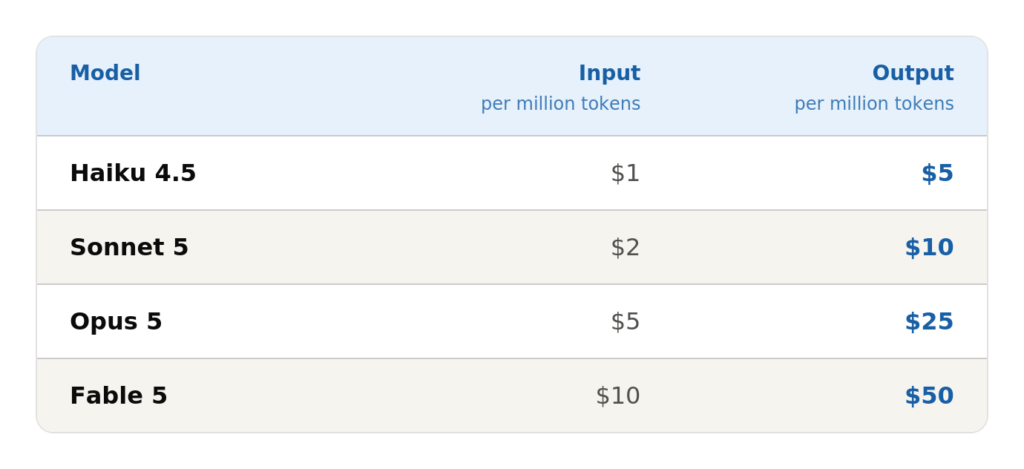
Now put a Zoho build against those rates. A realistic implementation conversation — describing your sales process, pasting in error messages, iterating on Deluge, working through field mappings — runs maybe 15,000 input tokens and 1,500 output tokens per meaningful exchange once your context has some history in it. Call it 800 exchanges across a full build. That’s roughly 12 million input tokens and 1.2 million output tokens.
- On Sonnet 5: about $36
- On Opus 5: about $90
Prompt caching and batching push that lower still. And most people won’t touch the API at all. They’ll use a Claude subscription, which is flat-rate: Pro at $17/month billed annually or $20 monthly, Max starting at $100/month for heavier use. Three months of Pro while you build is $60. Three months on Max 5x is $300.
So the AI line item on a DIY Zoho implementation lands somewhere between fifty and three hundred dollars. It is, genuinely, not the expense.
The hours are the expense
Here’s what nobody puts in the DIY column.
A small-business Zoho CRM implementation — 5 to 15 users, real pipeline stages, email integration, migrated data from a spreadsheet or an old system, a few automations, working dashboards — costs time whether or not it costs money. Doing it yourself with AI assistance, from a standing start:
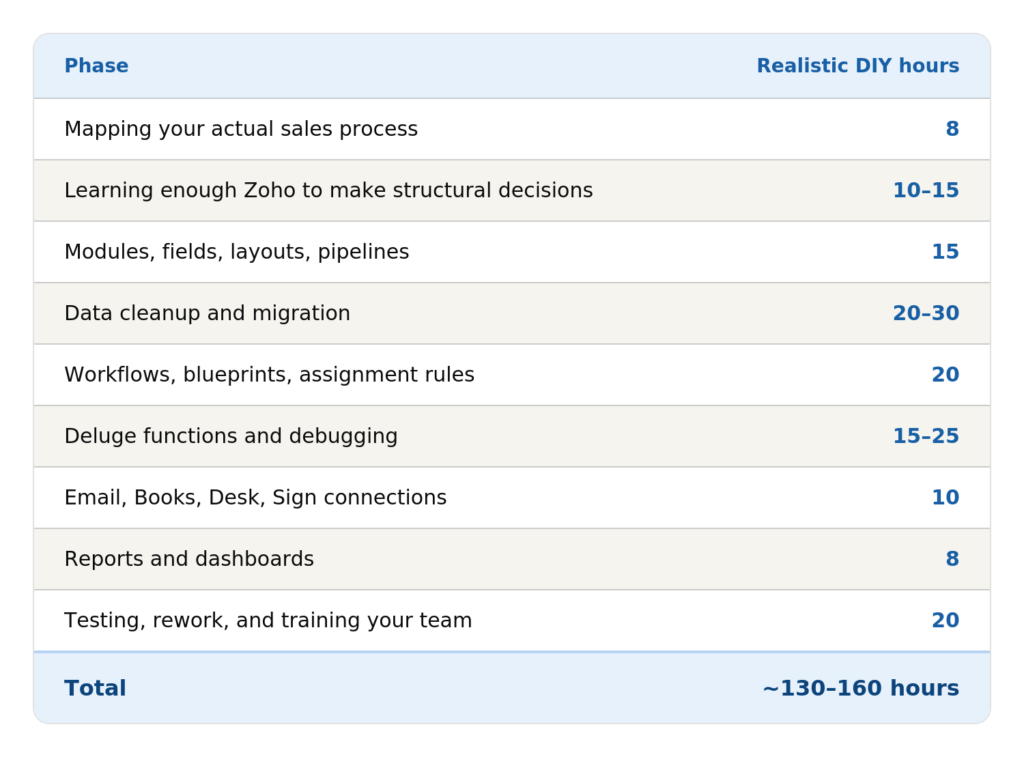
That’s three to four months of evenings and Saturday mornings, or a solid month of full-time attention you don’t have.
Now price it. If you’re the owner and your working hour is realistically worth $100 — conservative for someone who could be selling, delivering, or hiring instead — 140 hours is $14,000 of your time. At $75/hour it’s $10,500. Even at $50/hour, which almost certainly understates what an owner’s time is worth, it’s $7,000.
The DIY path isn’t cheap. It’s just billed to a different account.
What a consultant costs
Zoho partner rates in the US generally run $125 to $200 per hour, with regional variation. A scoped small-business implementation of the kind described above typically lands somewhere between $6,000 and $18,000 depending on data complexity, how many Zoho One apps you’re connecting, and how much custom Deluge you need. Treat those as ranges to sanity-check a proposal against, not a quote.
The same build a DIY owner does in 140 hours takes me, an experienced consultant 10 to 30. Not because we work faster on the same tasks, but because we skip the ones that don’t matter and we already know which structural decision at hour three prevents the rebuild at hour ninety.
Your time cost doesn’t go to zero, though. Budget 5 to 15 hours on your side for discovery calls, decisions, testing, and adoption. Anyone who tells you a CRM implementation requires nothing from you is selling you something you won’t use.
Side by side
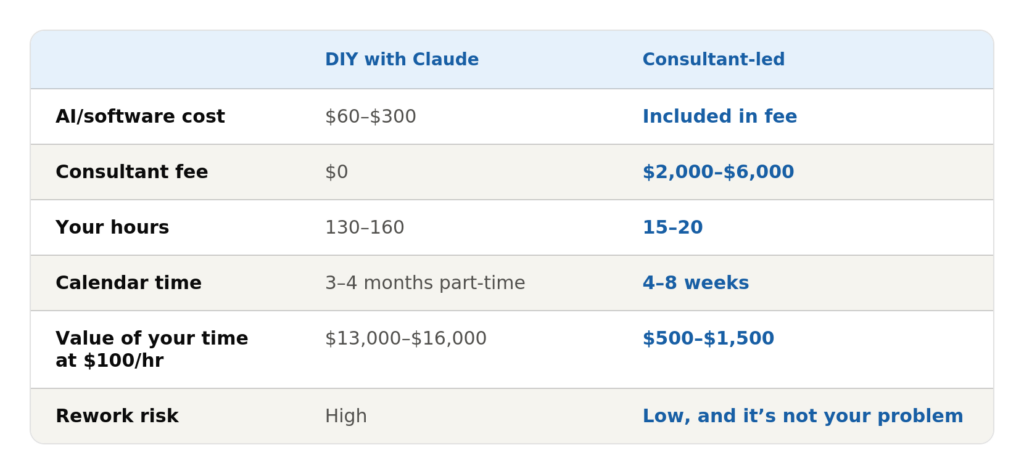
The crossover isn’t subtle. DIY wins on total cost only if your hour is worth less than roughly $70 and nothing goes badly wrong. That second condition is the one that fails.
The line item nobody budgets for
Rework.
The expensive mistakes in a Zoho build are structural, and they don’t announce themselves until you’re a hundred records deep. A few that come up over and over:
- Leads vs. Contacts. Deciding whether you use the Leads module at all shapes every downstream report, automation, and conversion mapping. Changing your mind after migration means reprocessing your entire database.
- The unique field you picked for deduplication. Choose wrong and you’ll be merging duplicates by hand for a year.
- Ownership, territories, and sharing rules. These determine who sees what. Retrofitting a territory model onto a live org with existing records is a project of its own.
- Books-to-CRM sync. Once contacts and items are syncing between Zoho CRM and Zoho Books, unwinding a bad mapping is genuinely painful.
- Custom fields that should have been picklists, picklists that should have been lookups, and lookups that should have been a related module.
None of these is exotic. All of them are cheap to get right on day one and expensive to fix in month six. When a DIY build fails, it usually isn’t because someone couldn’t write the Deluge. It’s because the foundation was poured before anyone knew what the building was for.
Where AI is genuinely strong on Zoho — and where it isn’t
I use Claude on a regular basis. It’s made me faster at my own job, which is part of why I’ll give you a straight answer here instead of pretending it isn’t useful.
It’s excellent at:
- Writing and debugging Deluge, especially when you paste in the actual error
- Explaining what a Zoho feature does and how it differs from the thing next to it
- Turning a rambling description of your sales process into a structured field-and-stage spec
- Drafting formula fields, validation rules, and criteria patterns
- Documenting what you built, which you will not otherwise do
- Building a data migration mapping from your spreadsheet headers to CRM fields
It’s unreliable at:
- Knowing what’s actually in your org. It can’t see your config unless you show it.
- Edition-specific limits. Workflow rule caps, custom field counts, and function limits differ by Zoho edition and change over time. AI will state a number with total confidence, and that number may be from two years ago.
- Deprecated Deluge tasks and old API versions. It will produce code that used to work.
- Telling you not to build something. Ask for a workflow and you’ll get a workflow, even when the honest answer is that your process is the problem and no automation will save it.
That last one is the real gap. AI optimizes for answering your question. A consultant’s actual job is often to tell you that you’re asking the wrong one. I’ve talked more clients out of custom builds than into them, and that conversation has never once come from a chatbot.
If you go the DIY route, validating what the AI hands you is not optional. Test in a sandbox, verify limits against current Zoho documentation, and never run a generated function against production data the first time.
So which one is right for you?
Do it yourself if: you have genuine time available, the patience to learn a platform properly, a fairly simple sales process, clean data in a spreadsheet, and no hard deadline. A solo operator or a two-person team setting up their first CRM is a good candidate.
Hire a consultant if: you’re migrating from an existing system, connecting multiple Zoho One apps, you have compliance or approval requirements, you’re above about five users, or the CRM going live late costs you real revenue.
Navigate CRM is a Zoho Partner based in Tennessee, working with businesses across the US. If you want a straight answer about which of these two paths fits your situation, that conversation is free — including the version where I tell you that you don’t need me.
Claude pricing figures verified against Anthropic’s published rates on August 31, 2026. Rates and plan structures change; check claude.com/pricing for current numbers. Consultant rate ranges are industry-typical figures for illustration, not a quote.